Publish to the web
Give your app its own web address so anyone can open it on a phone or a computer. No app store needed.
- About 1 minute
- Free
-
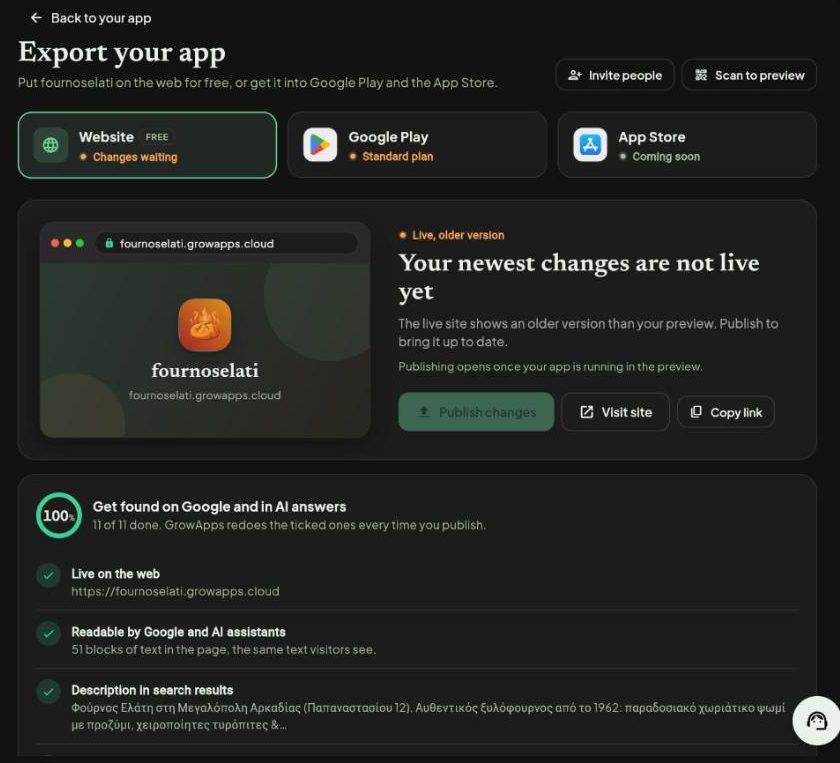
In your app, press the yellow Export button at the top right. You see Export your app.
-
Choose Website, then press Publish to the web.
-
Press Copy link and share it. Press Visit site to open it yourself.
What the Website page gives you
- Your own addressyourapp.growapps.cloud, free, with a padlock (https).Your address
- A clear statusLive, Live with an older version, or Not published.Status
- One press to updateAfter more changes, Publish changes brings the live site up to date.Publish changes
- VisitorsHow many people came in the last 14 days and where they found you.Visitors
- Your own domainSoonUse a name you own, like www.yourbakery.com.Use your own domain
- Take it down any timeTake offline hides the site until you publish again.Take offline
Publishing opens once your app is running in the preview. Every publish also runs the Get found on Google and AI checklist for you.
Screenshots taken from growapps.ai in October 2026. Something missing or out of date? Write to us from the contact page.